


In software development, code testing plays a crucial role in ensuring quality and preventing bugs. A common method is unit testing, where individual parts of code, such as functions or methods, are tested in a defined context. In the .NET world, xUnit and AutoFixture are powerful tools for optimizing testing. This blog post offers an introduction to how you can use these tools to write unit tests more efficiently.
1. Unit Testing
Unit testing involves testing small pieces of code, often at the method level, separately. This is done in a strictly defined context, known as the System Under Test (SUT). The goal is to detect errors early and increase code quality. In unit testing, you often use mocking frameworks such as Moq, Rhino Mocks or FakeItEasy to simulate dependencies and verify that your code functions correctly without dependencies on other system components.
2. xUnit
xUnit is a popular, open-source framework for writing unit tests in .NET. It offers a number of advantages:
- Parallel test execution: tests can be run simultaneously, increasing speed.
- Good integration with popular development tools and IDEs.
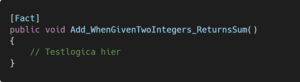
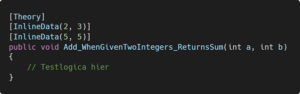
Within xUnit, you can write two types of tests using specific attributes:
- Fact: This attribute is used for a simple testing method without parameters.
- Theory: This attribute allows you to write parameterized test methods using the InlineData attribute to pass the different scenarios to.
3. AutoFixture
Writing test data manually can be time-consuming and error-prone. AutoFixture is an open-source framework that automatically generates test data. It reduces boilerplate code and makes your tests refactoring-safe, meaning you’re less likely to introduce failing tests when code changes are made.
3.1 Basic functions
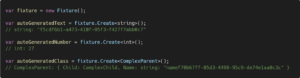
3.1.1 Create
This automatically generates objects with anonymous data.
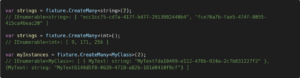
3.1.2 CeateMany
This makes it possible to generate a list of objects.
3.1.3 Build
Allows you to assign specific values to generated objects.
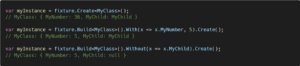
3.1.4 Inject & Freeze
These functions allow you to ensure that certain values are fixed for repeated use within your tests.
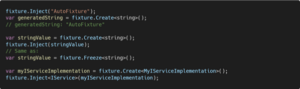
3.2 Integrating AutoFixture into xUnit
3.2.1 AutoData
Injects automatically generated objects into your tests. It is also possible to fix a value for a particular type using the additional Frozen attribute.
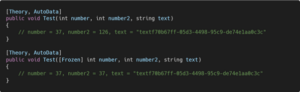
3.2.2 InlineAutoData
Combines manually entered test data with automatically generated objects.
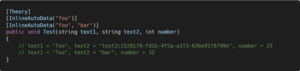
3.2.3 Integrating Moq into AutoFixture
The package AutoFixture.AutoMoq allows you to mock dependencies automatically. This turns AutoFixture into an auto-mocking container, reducing the amount of manual work you need to do to set up mocks for your tests.
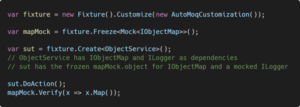
3.2.4 Combining AutoFixture, Moq and xUnit
By combining AutoFixture, xUnit and Moq, you can write tests that include automatically generated objects, simulated dependencies (mocks) and the SUT (System Under Test). This using the following two custom attributes that can be used on each test afterwards.
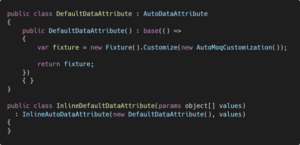
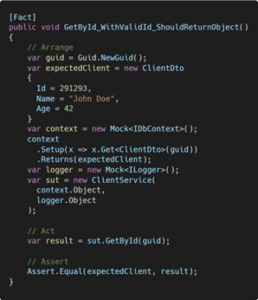
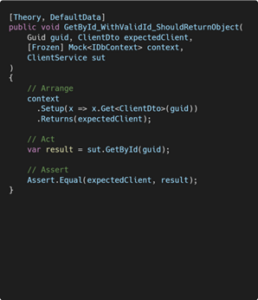
This custom attribute contains only the customization to make AutoFixture an auto-mocking container but can be extended with all the necessary elements frequently needed in your tests. For example, in it you can set up an in-memory database with Entity Framework, give a fixed value to a certain field of an object, the possibilities are endless. This significantly reduces the amount of boilerplate code. Below, on the left, we can see a test without using the tools mentioned in this blog post. On the right, we can see how the number of lines written is drastically reduced when you do use them.
Written by: Kevin V.